North Atlantic Storms

Mapping Hurricanes Data III

Gaston Sanchez

About

Using the storms data, I want to show you a variety of examples for displaying maps, for doing more data manipulation, and for obtaining more data visualizations.

Required Packages

The content in these slides depend on the following packages1:

library(tidyverse)      # data wrangling and graphics

library(lubridate)      # for working with dates-times data

library(sf)             # for working with geospatial vector-data

library(rnaturalearth)  # maps data

library(gganimate)      # animations for ggplot

library(plotly)         # web interactive plots

Recap: Visualizing storms trajectories

To visualize the trajectories of storms, we’ve discussed one simple approach based on:

  1. Use map data from "rnaturalearth"

  2. Specifically, import map data as objects of class "sf"

  3. Make maps with:

# one option
ggplot(map_data) + geom_sf() + geom_...(storms, aes(long, lat)) + etc


# another option
ggplot() + geom_sf(map_data) + geom_...(storms, aes(long, lat)) + etc

Recap: example

# filtered storms
storms75 = filter(storms, year == 1975)

# map data (as "sf" object)
map_world = ne_countries(returnclass = "sf")

# map with storms trajectories
ggplot(data = map_world) +
  geom_sf(color = "gray60") +
  coord_sf(xlim = c(-110, 0), 
           ylim = c(10, 60)) +
  geom_point(data = storms75,
             aes(x = long, y = lat, color = name)) +
  theme_minimal() + 
  theme(legend.position = "none") +
  labs(title = "North Atlantic Storms, 1975")

Recap: example

Number of Storms per Year

Exploration: Number of Storms per Year

# not exactly the counts we're looking for
storm_counts = storms |>
  count(year, name)

storm_counts
# A tibble: 655 × 3
    year name         n
   <dbl> <chr>    <int>
 1  1975 Amy         31
 2  1975 Blanche     20
 3  1975 Caroline    33
 4  1975 Doris       29
 5  1975 Eloise      46
 6  1975 Faye        19
 7  1975 Gladys      46
 8  1975 Hallie      14
 9  1976 Belle       18
10  1976 Candice     11
# ℹ 645 more rows

Exploration: Number of Storms per Year

# these are the counts we want
storm_count_per_year = storms |>
  count(year, name) |> 
  count(year, name = "count")

storm_count_per_year
# A tibble: 48 × 2
    year count
   <dbl> <int>
 1  1975     8
 2  1976     7
 3  1977     6
 4  1978    11
 5  1979     8
 6  1980    11
 7  1981    11
 8  1982     5
 9  1983     4
10  1984    12
# ℹ 38 more rows

Exploration: Number of Storms per Year

View Code
storm_count_per_year |>
  ggplot(aes(x = year, y = count)) +
  geom_col() +
  theme_minimal() +
  labs(title = "Number of Storms per Year (1975 - 2021)")

Exploration: Number of Storms per Year

View Code
storm_count_per_year |>
  ggplot(aes(x = year, y = count)) +
  geom_col(fill = "gray70") +
  geom_smooth(se = FALSE, color = "red") +
  theme_minimal() +
  labs(title = "Number of Storms per Year (1975 - 2021)")

Type of Storms Over Time

Exploration: Maximum Wind for each Storm

# add `wind_max` column
max_wind_storms = storms |>
  group_by(year, name) |>
  summarise(
    wind_max = max(wind),
    .groups = "drop")

slice_head(max_wind_storms, n = 10)
# A tibble: 10 × 3
    year name     wind_max
   <dbl> <chr>       <int>
 1  1975 Amy            60
 2  1975 Blanche        75
 3  1975 Caroline      100
 4  1975 Doris          95
 5  1975 Eloise        110
 6  1975 Faye           90
 7  1975 Gladys        120
 8  1975 Hallie         45
 9  1976 Belle         105
10  1976 Candice        80

Exploration: adding wind-scale with case_when()

# adding a wind-scale column
storms_status = max_wind_storms |>
  mutate(wind_scale = case_when(
      wind_max <= 33 ~ -1L,
      wind_max <= 63 ~ 0L,
      wind_max <= 82 ~ 1L,
      wind_max <= 95 ~ 2L,
      wind_max <= 112 ~ 3L,
      wind_max <= 136 ~ 4L,
      wind_max >= 137 ~ 5L
    )
  )

slice_head(storms_status, n = 10)

Exploration: adding wind-scale

# A tibble: 10 × 4
    year name     wind_max wind_scale
   <dbl> <chr>       <int>      <int>
 1  1975 Amy            60          0
 2  1975 Blanche        75          1
 3  1975 Caroline      100          3
 4  1975 Doris          95          2
 5  1975 Eloise        110          3
 6  1975 Faye           90          2
 7  1975 Gladys        120          4
 8  1975 Hallie         45          0
 9  1976 Belle         105          3
10  1976 Candice        80          1

Exploration: type of storms over time

View Code
storms_status |>
  count(year, wind_scale) |>
ggplot() +
  geom_col(aes(x = year, y = n, fill = factor(wind_scale))) +
  labs(title = "Number of Storms per Year, and Status",
       y = "Count") +
  theme_minimal()

Exploration: type of storms over time

View Code
storms_status = storms_status |>
  mutate(wind_scale = ordered(wind_scale))

storms_status |>
  count(year, wind_scale) |>
ggplot() +
  geom_col(aes(x = year, y = n, fill = wind_scale)) +
  facet_wrap(~ wind_scale, scales = "free_y") +
  labs(title = "Number of Storms Over Time, and Status",
       y = "Count") +
  theme_minimal() +
  theme(panel.grid.minor = element_blank(),
        legend.position = "none")

Animations

Animation example: 2020 Hurricane Season

Animations with gganimate

  • "gganimate" extends the grammar of graphics as implemented by "ggplot2" to include the description of animation.

  • It provides a range of new grammar classes that can be added to the plot object in order to customize how it should change with time.

  • I will show you just one example.

ggplot + gganimate

  • As usual, start your graphic with ggplot()

  • Add layers with graphical primitives, i.e. geoms

  • Optionally, add formatting specification(s)

  • Add animation specification(s)

Start with ggplot

storms2020 = filter(storms, year == 2020)

map_world = ne_countries(returnclass = "sf")

map_storms2020 = ggplot(data = map_world) +
  geom_sf() +
  geom_point(data = storms2020, 
             aes(x = long, y = lat, color = name, size = wind), 
             alpha = 0.9) +
  coord_sf(xlim = c(-110, 0), ylim = c(5, 60)) +
  theme_minimal() + 
  theme(legend.position = "none")

map_storms2020

Start with ggplot

For convenience, we add a datetime column

  • We create a date column by joining year, month, and day

  • We also create a time column by joining hour with "00:00"

  • And then we create a datetime column using the ymd_hms() function from package "lubridate"


storms2020 = storms |>
  filter(year == 2020) |>
  mutate(date = paste0(year, "-", month, "-", day),
         time = paste0(hour, ":00:00"),
         datetime = ymd_hms(paste(date, time)))

Adding transitions

anim2020 = ggplot(data = map_world) +
  geom_sf() +
  geom_point(data = storms2020, 
             aes(x = long, y = lat, color = name, size = wind), 
             alpha = 0.9) +
  coord_sf(xlim = c(-110, 0), ylim = c(5, 60)) +
  theme_minimal() + 
  theme(legend.position = "none") +
  labs(title = 'Date: {frame_time}', x = '', y = '') + 
  transition_time(datetime) +
  shadow_wake(wake_length = 0.7) +
  ease_aes('linear')

Optional: saving animation in gif file

anim_save(
  filename = "hurricane-season-2020.gif", 
  animation = anim2020,
  nframes = 200, 
  fps = 10)

Animations with "plotly"

Plotly Interactive graphics with ggplotly()

  • As you know, you can take a ggplot object and feed it to ggplotly()

  • ggplotly() converts the graphic to a plotly object

  • Interestingly, you can also make animated views with "plotly"

Animation with "plotly"

In the ggplot command, include a frame aesthetic to indicate the variable that will be used to produce the animation frames. For example: frame=year

storms2020 = filter(storms, year %in% 2000:2020)

map_world = ne_countries(returnclass = "sf")

# messy ggplot
ggmess = ggplot(data = map_world) +
  geom_sf(color = "gray60") +
  coord_sf(xlim = c(-110, 0), ylim = c(10, 60)) +
  geom_path(data = storms2020, 
             aes(x = long, y = lat, group = name, frame = year), 
             color = "#1726FF", alpha = 0.8) +
  theme_minimal() + 
  theme(legend.position = "none")

Then, pass the ggplot object to ggplotly()

Animated view

View Code
ggplotly(ggmess) |>
  animation_opts(frame = 1200, transition = 0)

Shiny App

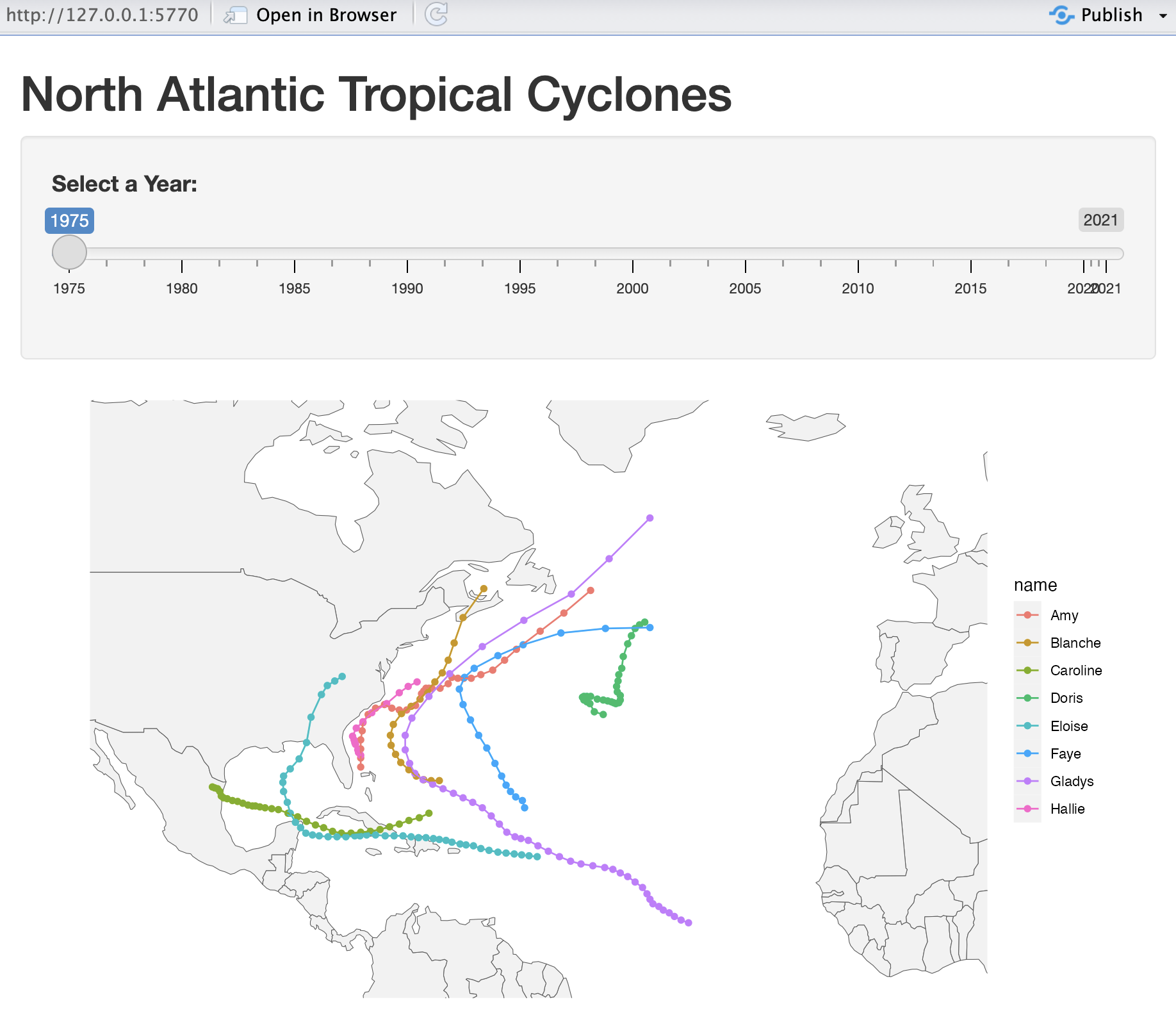
Hurricane Seasons

https://github.com/data133/shiny/blob/main/mapping-storms1-basic/app.R